Snipo cuts the silences and filler words from your videos.Say “um” as many times as you want: Snipo cuts it out.
Record yourself talking to camera and the app hands back your video with no pauses, no “um” and no retakes, with captions. In English or Spanish, right from your phone.The app that edits your talking-to-camera videos on its own: it cuts silences, filler words and retakes, and keeps your best take. In English or Spanish, right from your phone.
- For
- Creators
- Influencers
- UGC
- Clippers
Joining the waitlist is free. We'll let you know when we open.
Your video, no filler
Um… hi, like… today I'm gonna show you I mean, no, wait…
Live
Watch Snipo edit
It marks in red what you didn't need to say, then cuts it. Turn a switch off and that stays in your video.
Um… hi, · · · 3 s of silence like… today I'm gonna show you I mean, no, wait, one more time. Today I'm gonna show you three ways to wear this bag.
- Silences:
- long pauses
- Fillers:
- um, like, you know
- Retakes:
- you repeat a line, the best one stays
Before / after
Same video. No filler.
You recorded almost two minutes of pauses and do-overs. Snipo hands you back less than one, ready to post.
Um… hi, like… today I'm gonna show you I mean, no, wait…

Today I'm gonna show you three ways to wear this bag.
56 seconds of filler, gone.

Illustrative example. Results depend on your video.
How it works
That simple
From your camera roll to ready-to-post, without opening an editor.
Step 1: Record or pick your videos
One or a whole batch: line them up. Talk to camera like you always do and mess up all you want.
Step 2: Snipo edits them on its own
One after another, no babysitting: it cuts silences, fillers and retakes, adds captions and pings you when each video is ready.
Step 3: Review and save
Don't like a cut? Change it with one tap. It lands in your camera roll, ready for TikTok, Reels or Shorts.

Features
Snipo cuts it. You make it yours.
The filler goes on its own. Then, if you want, you style it without leaving the app.
Looks
Cinematic looks
Color, lens, grain and film bars in one tap. Save your combo as a template and use it on every new video.
Captions
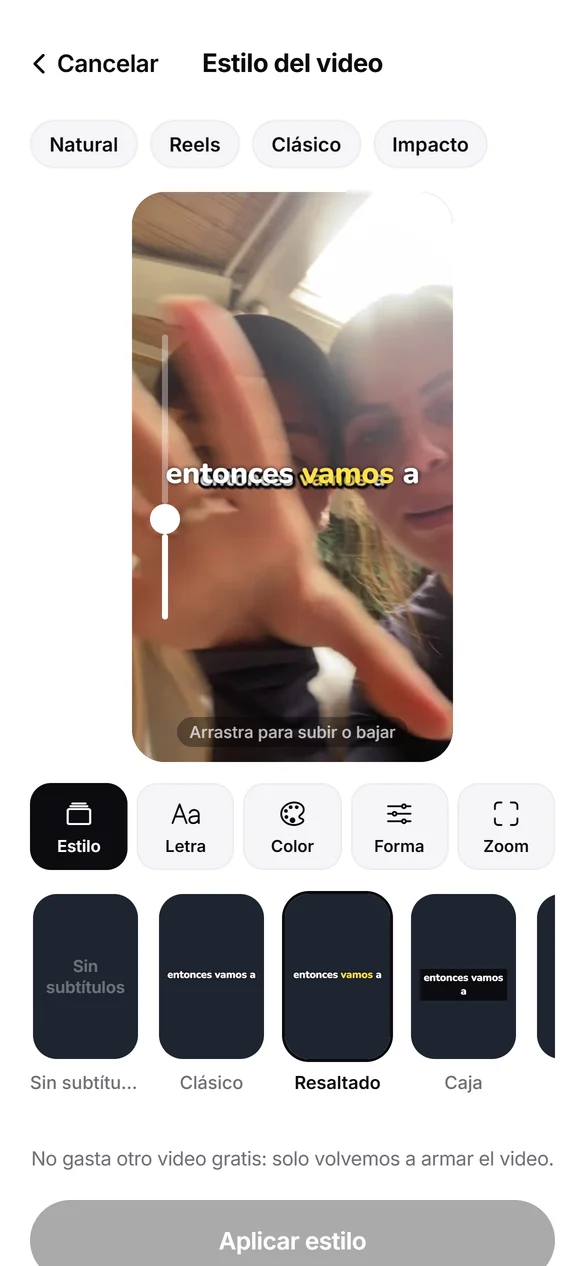
Captions and zoom
Pick the font, color and size, and the word being spoken lights up. A gentle zoom between sections so it never looks flat.
Cuts
You get the final say
Tap a cut word to bring it back, or a normal one to remove it. You can also fix anything transcribed wrong.
Clips
Videos and photos on top
Add a clip or a photo full screen, picture-in-picture or split screen.
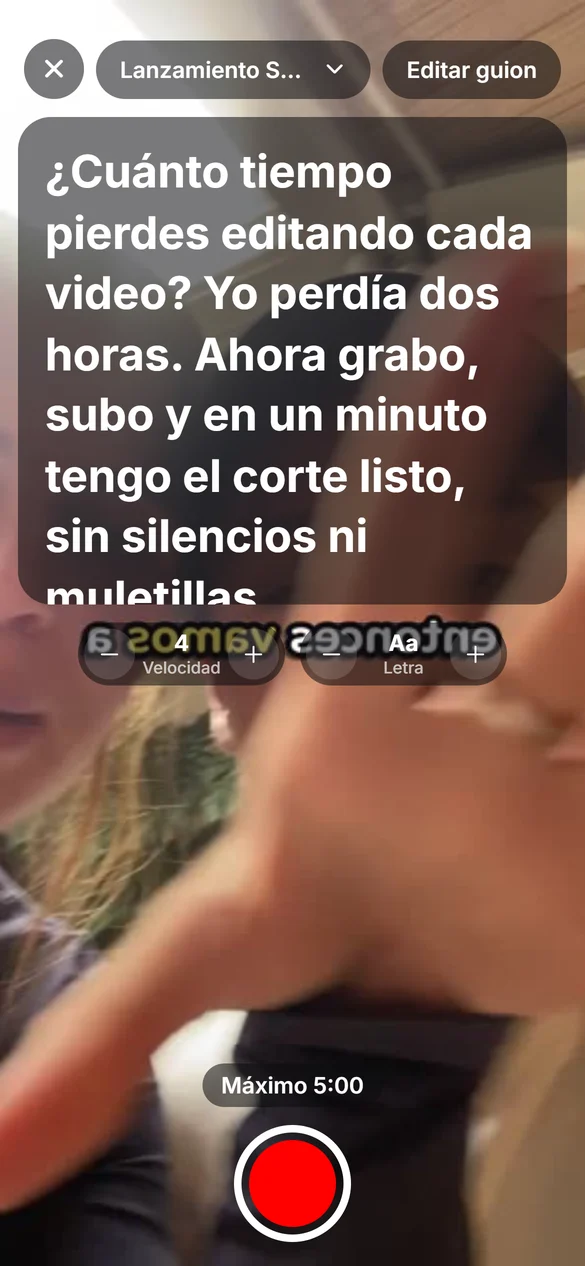
Teleprompter
Record with a script
Your script scrolls right by the lens while you record. You read, Snipo cuts.
Languages
Spanish and English
It cuts filler words in both languages. And the app is in English too.
Illustrative images.
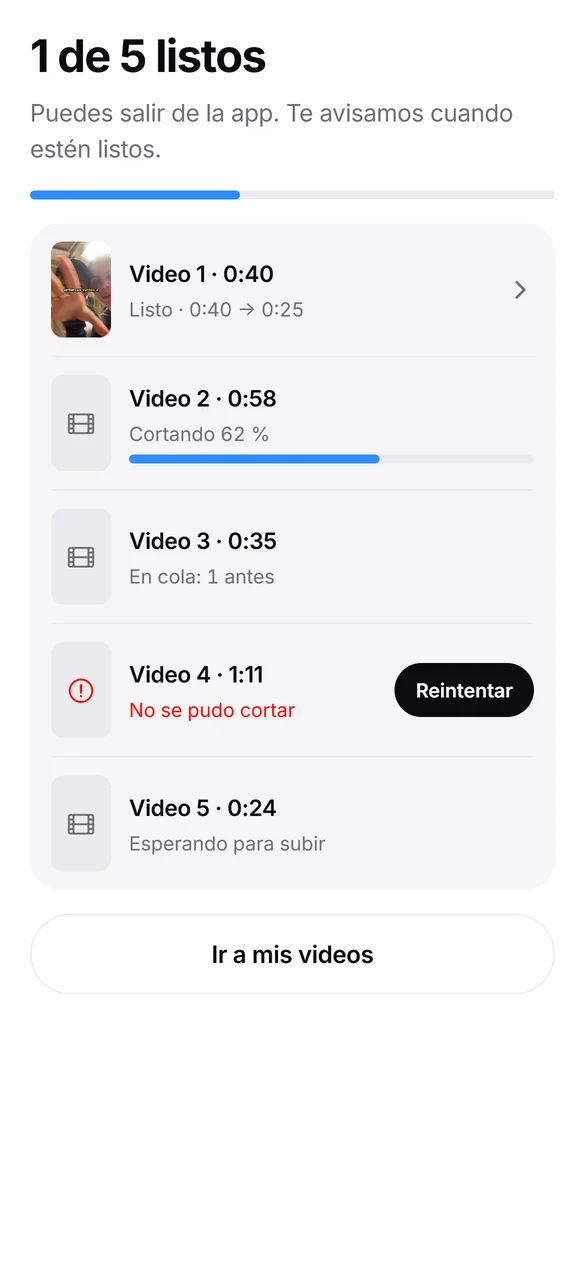
Queue
Your queue edits itself
Line up several videos, get on with your day, and we'll ping you when each one is ready.

Tap a folder to open it · + to add a video
It gets how we talk. These go:
- um…
- uh…
- like
- you know
- I mean
- so
- basically
- literally
- right?
- kinda
- well
- hmm
- you know what I mean?
- actually
- sort of
- okay so
- anyway
- uhhh
- I guess
- yeah, no
The problem
Recording takes minutes. Editing takes the rest of the afternoon.
- Watching five takes to find the good one.
- Cutting every “um”, every “like”, every silence.
- Exporting, reviewing, and cutting again.
Snipo does that for you.while you record the next one
Why Snipo
Built for how we talk
Queue it and walk away
Line up several videos, get on with your day, and we'll ping you when they're done.
It gets how you talk
“Like”, “you know”, “I mean”… they go too. In Spanish as well.
Android and iPhone
From November, on the phone you already have.
Your face and voice, untouched
We cut the filler; captions, look and zoom are your call. Your face and voice stay as they are.
If it fails, it's free
A badly cut video doesn't count against your plan.
In your currency
There'll be a free plan and paid plans in your currency.
Who it's for
Built for people who post a lot
Content creators: post every day without living in an editor.
Influencers: more content in the same time, in your own voice.
UGC creators: more deliverables per week for your brands, TikTok Shop included.
Clippers: stream and podcast clips without pauses or fillers, done faster.
Editors with clients: the first cut, already done.
About
About us
We're building Snipo because recording a video takes minutes and editing it takes all afternoon. We want posting to be as easy as talking.
Made in Latin America
For the way people really talk, accents and “um” included.
Made by creators
We make videos and hate editing them as much as you do.
The list leads
Early sign-ups tell us what to build and get to try it first.
Waitlist
We'll tell you when we open
Leave your email. The questions are optional and help us build Snipo for you.

FAQ
Frequently asked questions
What is Snipo?
An app that edits your talking-to-camera videos. It cuts the silences, filler words and retakes, and keeps your best take of every line.
Who is it for?
Content creators, influencers, UGC creators, clippers and editors with clients: anyone who posts talking videos often. See who it's for.
When does it launch?
In November 2026, on Android and iPhone. Join the waitlist and you'll be the first to know when we open.
How much does it cost?
Joining the waitlist is free. When we open there'll be a free plan and paid plans in your currency.
What exactly does it cut?
Silences (long pauses), filler words (um, uh, like, you know…) and retakes: if you repeat a line, the best one stays.
Can I edit several videos at once?
Yes. Queue them up and Snipo edits them one after another, on its own. No need to watch: we'll ping you when each one is ready.
Does it add captions?
Yes. Captions from what you say, filler already gone. You pick the font, color, size and position, and you can add zoom and a cinematic look.
Can I record in the app?
Yes, with a teleprompter: your script scrolls by the lens while you talk. You can also pick videos already in your camera roll.
Does it post straight to my socials?
No. It saves to your camera roll, ready to upload to TikTok, Reels or Shorts whenever you want.
What if it cuts something I wanted?
Before saving you review the video and change any cut with one tap. And if a video comes out badly cut, it doesn't count against your plan.
Does it change my face or voice?
No. Snipo cuts what you don't need and, if you want, adds captions, a look and zoom. It never generates or alters your face or voice.
Does it work in English?
Yes. It cuts English filler words (um, like, you know…) and the app is in English too. It's also built for Spanish as it's spoken across Latin America: “este”, “o sea”, “pues”.
Stop editing. Start posting.
Join the waitlist for free. We'll tell you first, and early sign-ups get to try it first.